On Writing
Write to Stick vs. Grammarly: which one should edit your next post?
Grammarly makes sentences correct. Write to Stick makes arguments hold.
September 23, 2026
Grammarly is the best sentence-level writing checker there is. It’s on hundreds of millions of devices, it catches things you’d miss, and its free tier is good enough that most people never pay. We use it. If you’re deciding between Grammarly and Write to Stick, the honest answer is that they’re not competing for the same job, and the useful question is which job you have.
What Grammarly is for
Grammarly polishes text you’ve already written, wherever you write it. Grammar, spelling, punctuation, passive voice, wordiness, tone. In 2026 the Pro tier adds full-sentence rewrites, a “Voices” feature that tunes suggestions toward your writing style, a humanizer, an AI-detection feature (Authorship), plagiarism checks, and, for teams, a brand style guide that flags deviations across every writer. It’s $12 a month on an annual plan, $30 month-to-month, and the free plan includes a limited number of AI prompts.
Its reach is the product. Gmail, Docs, Slack, LinkedIn, Word, your CMS: Grammarly is there, underlining. For catching the mistake you’d otherwise send, nothing else comes close.
What Grammarly doesn’t do
Read the independent reviews from this year and they converge on one sentence: it can’t replace an editor on structure or judgment. That’s not a knock. It’s the design. Grammarly evaluates sentences. It has no opinion about whether your third paragraph supports your conclusion, whether the statistic in paragraph two proves what you say it proves, or whether the whole piece is arguing for the thing you think it’s arguing for.
Those are the places readers leave. Not at the comma splice; at the claim that doesn’t hold. We wrote about this in Structural editing vs. copyediting: a typo costs you a wince, a broken argument costs you the reader. Grammarly will make the broken argument grammatically flawless.
Two more things worth knowing before you rely on it for higher-stakes work. Its full-sentence rewrites are generative, which means they add and restate as readily as any chatbot; ask for a tighter sentence and you’ll often get a longer one. And the AI-detection and humanizer features are aimed at detectors, not readers. Passing a detector and sounding like yourself to someone who knows you are different goals.
What Write to Stick is for
Write to Stick is an editor for short pieces that have to persuade: the post, the memo, the pitch email, the essay. It works on the argument and the voice, and it treats the sentence-level polish as table stakes rather than the point.
Concretely, three things Grammarly doesn’t attempt:
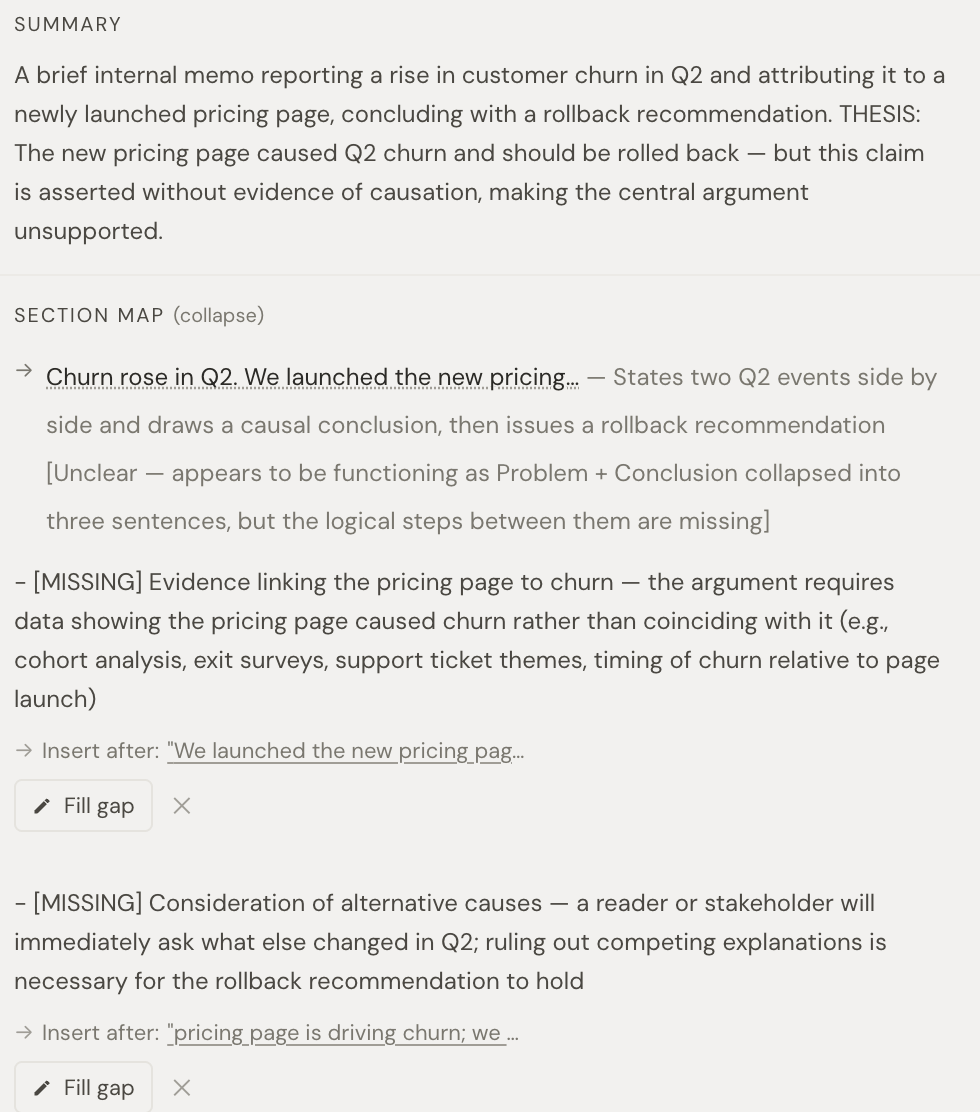
It reads the whole piece as a skeptical reader would. It names your thesis in one line, traces the chain of claims, and points at the one link most likely to snap first. Not a hundred underlines; one place to fix.
It writes with your own writing in the room. Enable samples of pieces you’d stand behind, and drafts are shaped by them rather than by a house style guide.
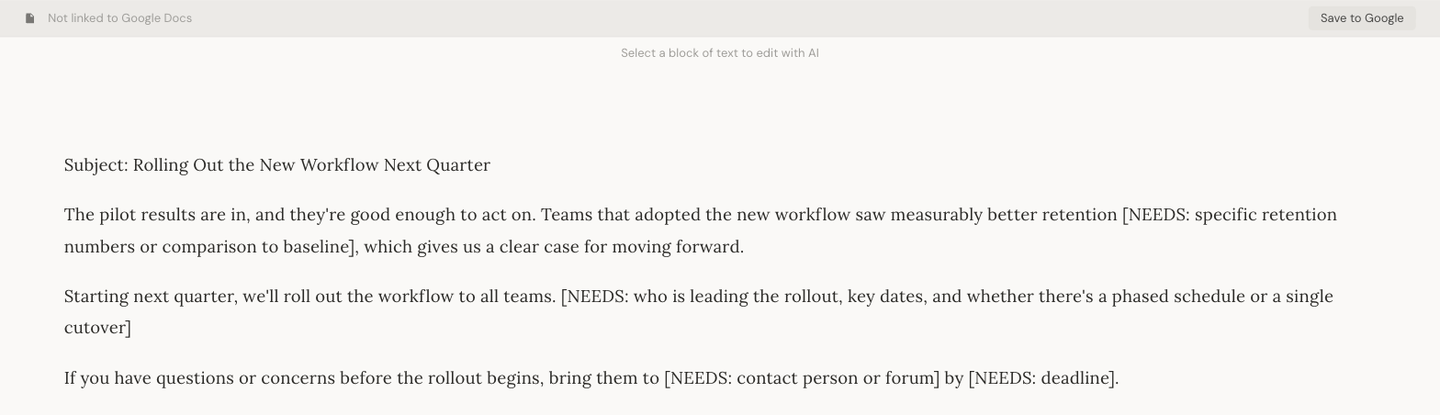
It refuses to invent evidence. Where your argument needs a number or a source you haven’t supplied, it marks the gap, [NEEDS: citation], instead of filling it with something plausible. Why that matters.
And when you ask it to edit a sentence, it makes the smallest edit that satisfies the instruction, including no edit at all when the sentence was already right.
What Write to Stick doesn’t do
It isn’t everywhere. There’s no browser extension underlining your Slack messages; you bring a piece to it, or import a Google Doc and push the result back. It isn’t a spellchecker; it assumes you’ve got one. It doesn’t check plagiarism, detect AI text, or enforce a team style guide. If your writing problem is “I make errors in email,” Grammarly is the answer and Write to Stick is overkill.
Write to Stick has no subscription: you pay as you go from a prepaid credit balance, charged for the AI work you actually run. New accounts start with $1 of free credit, and top-ups run from $3 to $36.
Side by side
Grammarly: sentence-level correctness and tone, everywhere you type, for everyone. Pro at $12/month annual.
Write to Stick: argument-level editing and verified voice, for pieces that have to persuade, brought to the editor or round-tripped from Google Docs. Pay as you go, no subscription, $1 of free credit to start.
Overlap: both will tighten a wordy sentence. Grammarly’s rewrites tend to add; Write to Stick’s are gated to the smallest change.
Neither does: the other’s job.
Which one you need
If you write a lot of everyday text and want fewer mistakes, keep Grammarly. It’s probably already installed.
If you write things that have to land, a post you’ll be judged on, a memo that has to change a decision, an email that has to get a reply, then correctness is the floor, not the ceiling. The question is whether the argument holds and whether the reader can hear you in it. That’s the job Write to Stick was built for, and it’s the job a grammar checker was never meant to do.
A reasonable setup is both. Write to Stick on the draft, to make it sound and make it yours. Grammarly on the way out the door, to catch the typo.